

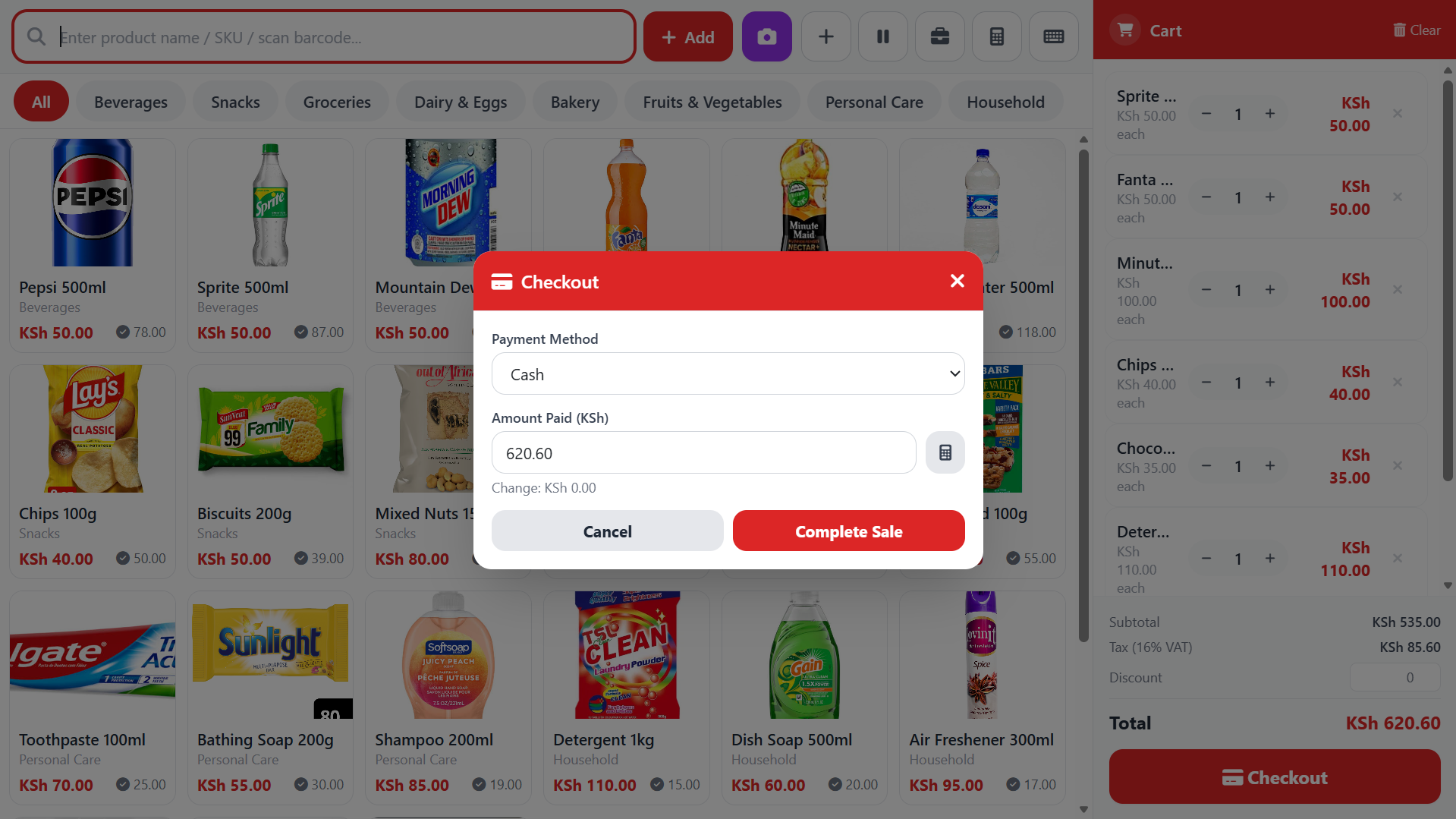
Today, cloud-based POS systems offer a more flexible approach to business management.
Introduction: The Future of Business Management Is in the Cloud
Technology has transformed how modern businesses operate. From supermarkets and minimarts to pharmacies, hardware stores, wholesalers and furniture shops, businesses increasingly rely on digital solutions to manage sales, inventory, payments and customer relationships.
However, not all business software works the same way.
For years, many businesses have relied on traditional on-premise Point of Sale (POS) systems installed on computers within their premises. While these systems have served businesses well, they can present challenges when business owners need remote access, real-time reporting, multiple-branch management and integration with modern digital payment solutions.
Today, cloud-based POS systems offer a more flexible approach to business management.
With a modern solution such as ZillahPOS by Zillah Technologies LTD, businesses can streamline their operations, monitor performance and access powerful sales management tools without depending entirely on software installed on a single computer.
So, what makes a cloud-based POS better than traditional on-premise software?
Let's explore the differences.
1. What Is a Cloud-Based POS System?
A cloud-based Point of Sale system is business management software that stores and processes its central data through internet-connected servers rather than relying exclusively on a computer at the business premises.
Depending on the system, authorised users can access sales records, inventory information, customer details and business reports through a web browser or compatible application.
For example, a business owner can use a laptop or smartphone to review business performance without necessarily being physically present at the shop.
A cloud-based POS can help businesses manage:
- Daily sales and transactions.
- Product inventory and stock movements.
- Customer information.
- Supplier and purchasing records.
- Business expenses.
- Sales and financial reports.
- Multiple branches.
- Digital payment integrations.
Instead of treating the computer at the counter as the only place where business information exists, a cloud-based system makes it possible to manage operations through a connected digital platform.
2. What Is Traditional On-Premise POS Software?
An on-premise POS system is installed on computers or servers located at the business premises. Its main database is typically stored locally, although some systems also support remote access and cloud backups.
This approach can work well for businesses that need local control and the ability to continue selling without an internet connection.
However, traditional systems may require additional infrastructure and maintenance to provide the flexibility offered by modern cloud platforms.
For instance, if sales records are stored on a single computer, accessing reports remotely may require a separate configuration or additional software.
Similarly, businesses operating multiple branches may need to configure synchronisation or consolidate reports from different locations.
The main challenge is not that on-premise systems cannot support modern business operations. Rather, achieving these capabilities may require additional work, infrastructure and maintenance.
3. Cloud-Based POS vs On-Premise POS: The Key Differences
Understanding the differences can help business owners choose a solution that supports their current needs and future growth.
| Feature | Cloud-Based POS | Traditional On-Premise POS |
|---|---|---|
| Data storage | Central data stored or synchronised through cloud infrastructure | Data primarily stored on local computers or servers |
| Access to reports | Available remotely to authorised users with connectivity | Often centred on the local computer or business network |
| Hardware replacement | Users can often resume work on another compatible device | May require software reinstallation and data restoration |
| Data backups | May include managed cloud backups, depending on the provider | Often requires a separate backup process |
| Software updates | Can be deployed centrally by the provider | May require manual installation or local IT support |
| Multiple branches | Centralised management is often easier | May require additional configuration or separate installations |
| Digital integrations | Can support APIs and online payment integrations | Integrations depend on the software's architecture |
| Initial infrastructure | May require less local server infrastructure | May require dedicated computers or servers |
| Internet dependency | Cloud features generally require connectivity | Local operations can often continue without internet |
Important: These are general differences, not guarantees. Cloud systems vary in their backup arrangements, security controls and offline capabilities. On-premise systems can also provide remote access, integrations and automated backups when appropriately configured.
The right choice depends on how the software is designed and the needs of the business.
4. Why Modern Businesses Are Choosing Cloud-Based POS Systems
A. Access Your Business Information From Anywhere
One of the biggest advantages of cloud-based POS software is remote accessibility.
As a business owner, you should not always have to visit your shop just to find out how much you sold during the day.
With a suitable cloud-based POS, you can log in from an authorised device and review available business information remotely.
For example, imagine you operate a minimart in Machakos but need to travel to Nairobi for a business meeting.
Instead of waiting until you return to the shop, you can access your available reports and check your business performance.
This flexibility helps business owners make informed decisions while spending less time tied to a physical location.
B. Monitor Sales in Real Time
Accurate and timely sales information is essential for making sound business decisions.
Traditional systems that operate independently on separate computers may require manual report collection before management can get a complete picture of business performance.
A cloud-based POS can centralise sales information, allowing authorised users to monitor transactions and review updated reports as sales are recorded.
With ZillahPOS, businesses can use sales reporting features to understand their transactions, track performance and make more informed operational decisions.
Instead of relying entirely on handwritten records or end-of-day summaries, management can use digital records to understand what is happening in the business.
C. Reduce Dependence on a Single Computer
Imagine that your shop computer develops a technical problem or needs replacement.
If your entire POS database exists only on that computer and no reliable backup is available, recovering your business records may be difficult.
A cloud-based POS reduces this dependence by maintaining business data through its cloud infrastructure.
Depending on the provider's backup and recovery arrangements, authorised users may be able to access their records from another compatible device.
This can make hardware replacement and business recovery easier.
However, cloud hosting should not be treated as a guarantee that data can never be lost. Business owners should confirm that their POS provider has appropriate backup, security and recovery procedures.
D. Simplify Multiple-Branch Management
Managing more than one business location creates additional responsibilities.
You need to monitor stock, compare sales, track transactions and understand how each branch is performing.
When branches operate independent systems, managers may have to collect reports manually or use separate tools to consolidate their information.
A cloud-based POS designed for multi-branch operations can bring these activities together through a central platform.
ZillahPOS supports multi-branch management, helping businesses organise their operations across different locations.
For example, a retailer with outlets in Machakos and Nairobi can use an appropriate multi-branch configuration to manage stock and sales records across the business.
This makes it easier to oversee operations and identify areas that require attention.
E. Simplify Digital Payment Management With M-PESA STK Push
Mobile money has become an important part of everyday business transactions in Kenya.
However, manually confirming payments, recording transactions and reconciling sales can consume valuable time.
Modern POS systems can integrate digital payment services to streamline the payment process.
ZillahPOS supports M-PESA STK Push, allowing a business to prompt a customer to complete payment directly on their phone through a supported integration.
This helps simplify the checkout process and makes it easier to associate payments with sales records.
For businesses that handle many daily transactions, integrating payments with the POS can reduce repetitive manual work and improve record-keeping.
Payment workflows depend on connectivity and the configuration of the relevant payment integration.
F. Automate Stock Management
Inventory management is one of the most important responsibilities in retail and wholesale businesses.
Without reliable stock records, a business may struggle to identify fast-moving products, detect shortages or plan purchases effectively.
A modern POS connects sales activity with inventory management so that recorded transactions can update stock quantities.
ZillahPOS offers inventory management features that help businesses monitor stock levels and manage their products.
Its features include:
- Real-time stock management and reconciliation.
- Product expiry notifications.
- Low-stock notifications.
- Barcode scanning.
- Multi-branch stock management.
These features can help a business identify products that need restocking, monitor inventory movements and reduce the administrative burden of tracking stock manually.
For a minimart, for example, knowing which products are running low can help staff prepare purchase orders before popular items run out.
G. Manage Credit Sales and Outstanding Balances
Many businesses allow trusted customers to purchase products on credit and pay later.
Although credit sales can help maintain customer relationships, poor record-keeping can make it difficult to establish who owes money and how much remains outstanding.
A suitable POS system can help businesses record credit transactions and monitor outstanding balances.
With ZillahPOS, businesses can use credit-selling functionality to manage eligible credit sales and keep better track of customer balances.
Instead of depending entirely on notebooks or informal agreements, the business can maintain digital records to support follow-ups and reconciliation.
This is particularly useful for shops that regularly serve customers who make payments at a later date.
H. Expand Into Online Selling
Modern businesses increasingly need to serve customers beyond their physical premises.
A physical shop may have a strong product range, but potential customers cannot always visit during business hours or travel to the store.
An online ordering platform creates another channel through which customers can discover products and place orders.
ZillahPOS offers a Customer Website and eCommerce Addon that extends the POS into online selling.
Depending on the configured integration, the addon enables customers to:
- Browse products online.
- Place orders through the business website.
- Access product information without visiting the physical shop.
- Benefit from synchronised product and inventory information.
- Use connected customer and coupon information.
The addon is designed to synchronise relevant information between the website and ZillahPOS, helping businesses manage online and in-store operations through a connected system.
For example, a furniture store can display its products online, receive customer orders through its website and use its POS to manage the associated business operations.
This creates an opportunity to reach more customers without managing entirely separate product catalogues and inventory records.
5. How ZillahPOS Demonstrates the Advantages of Modern POS Software
ZillahPOS is a cloud-based Point of Sale and business management solution from Zillah Technologies LTD, designed to help businesses improve sales management, inventory control and day-to-day operations.
Rather than using disconnected tools for every business activity, businesses can use ZillahPOS to bring important sales and inventory processes together.
Here are some of the capabilities that make it a practical option for modern businesses.
Integrated Sales Management
Businesses can record transactions digitally and use available reports to monitor sales performance.
This helps management maintain organised records and understand how the business is performing.
M-PESA STK Push Integration
The system supports an integrated payment workflow that can prompt customers to complete payments on their phones.
This reduces the need to rely exclusively on manual payment recording.
Stock Control and Notifications
Businesses can monitor product quantities, use barcode scanning and receive alerts for low stock and products approaching expiry.
These capabilities support more organised inventory management.
Multi-Branch Support
Businesses with multiple locations can use the system's multi-branch functionality to coordinate relevant sales and stock management activities.
Credit Sales Management
Businesses that sell on credit can use the relevant functionality to maintain records of credit transactions and monitor outstanding customer balances.
Customer Website and eCommerce Addon
Businesses can extend their POS into online selling through a customer-facing website that integrates with relevant POS data.
This allows the business to serve customers through both physical and digital channels.
Together, these capabilities demonstrate how a modern POS can support more than checkout operations. It can become an important part of a business's wider management process.
6. A Practical Example: A Furniture Store Using ZillahPOS
Consider a furniture business that sells beds, sofas, dining tables, wardrobes and office furniture.
The business receives stock from suppliers, serves walk-in customers, accepts mobile money payments and wants to reach more customers online.
Using disconnected systems can create unnecessary work.
Staff may have to update stock records separately, record payments manually and maintain a different product list for the website.
A connected POS and eCommerce solution can simplify these processes.
With ZillahPOS, the business can:
1. Record sales: Staff record customer purchases through the POS and maintain digital sales records.
2. Monitor inventory: Stock records help the business keep track of product availability and inventory movements.
3. Accept M-PESA payments: Supported STK Push functionality helps customers complete payments through their phones.
4. Manage credit transactions: Where the business permits credit sales, it can record the transactions and track outstanding balances.
5. Sell online: Through the Customer Website and eCommerce Addon, the business can display products and receive online orders.
6. Coordinate operations: Relevant product, customer and stock information can be synchronised between the POS and connected website.
The result is a more connected approach to business management, with fewer separate processes to maintain.
For furniture stores, electronics shops, hardware stores and other retailers, this approach can help bridge the gap between physical sales and online customer engagement.
7. Is Cloud-Based POS Software More Cost-Effective?
Cost is another important consideration when choosing business software.
A traditional on-premise POS may involve an upfront software licence, local hardware, installation, maintenance and backup arrangements.
A cloud-based POS may reduce the need to maintain local servers and can make it easier to introduce additional users or compatible devices, depending on the provider's pricing model.
However, cloud software may involve recurring subscription, hosting or support fees.
The most cost-effective option depends on the total cost of ownership, including:
- Initial setup and installation.
- Software licensing or subscription fees.
- Hardware requirements.
- Internet connectivity.
- Technical support.
- Maintenance and upgrades.
- Backup and recovery arrangements.
- Payment integration costs.
- Additional modules and users.
Businesses should compare these costs over several years rather than choosing a system based only on its initial price.
The goal is to invest in a POS that provides practical value, supports reliable operations and can grow alongside the business.
8. What About Internet Connectivity and Data Security?
Cloud-based POS systems offer important advantages, but businesses should understand their requirements before making a decision.
Internet Connectivity
Most cloud-based POS systems require an internet connection to communicate with their central servers.
If connectivity is interrupted, some systems may become temporarily unavailable for certain operations.
Before selecting a POS, ask the provider what happens during an internet outage.
Find out whether the system supports offline sales, how transactions are stored and how information is synchronised when connectivity returns.
Do not assume every cloud-based POS supports offline operation.
Data Security
Business records contain important information about sales, inventory, customers and payments.
A reliable POS provider should have appropriate safeguards for protecting this information.
When evaluating a system, consider:
- Secure user authentication.
- Role-based access permissions.
- Data backup and recovery procedures.
- Secure communication between devices and servers.
- Software maintenance and security updates.
- Clear policies for accessing and exporting your business data.
Cloud technology does not automatically make software secure. Security depends on the provider's implementation and the practices followed by the business.
For additional protection, business owners should use strong passwords, restrict access to authorised staff and ensure that important business records can be recovered if a problem occurs.
9. Which Businesses Can Benefit From Cloud-Based POS?
Cloud-based POS solutions can benefit businesses that need organised sales records, better inventory visibility and more flexible access to operational information.
Examples include:
- Minimarts and supermarkets: Manage product sales, stock and barcode scanning.
- Pharmacies: Monitor inventory and product expiry information.
- Hardware stores: Organise large product catalogues and track stock movements.
- Electronics shops: Record transactions and monitor product availability.
- Furniture stores: Manage sales and connect physical retail with online ordering.
- Wholesalers: Monitor transactions and coordinate stock across locations.
- Fashion retailers: Track product variants and manage daily sales.
- Businesses with multiple branches: Coordinate operations through supported centralised management features.
The most suitable solution depends on the business's transaction volume, operational requirements, connectivity and budget.
10. Why Choose ZillahPOS From Zillah Technologies LTD?
Choosing a POS is not simply about finding software that can generate receipts.
It is about finding a solution that helps your business maintain accurate records, manage inventory, simplify payments and support future growth.
ZillahPOS brings together important business management capabilities, including sales tracking, stock control, M-PESA STK Push, multi-branch support, credit sales management and an optional customer-facing eCommerce solution.
For businesses looking to move beyond disconnected spreadsheets, handwritten records and isolated software installations, ZillahPOS offers a practical way to modernise sales and inventory management.
Whether you operate a minimart, furniture store, pharmacy, hardware shop or another retail business, the right POS can help you establish more organised processes and make better use of your business information.
Conclusion: Modernise Your Business With ZillahPOS
Traditional on-premise POS software can still be useful in certain environments, particularly where local operation without internet access is essential.
However, businesses that need remote access, centralised reporting, integrated digital payments, connected inventory management and online selling may benefit significantly from modern cloud-based solutions.
The important thing is to choose software that matches your operational needs rather than relying on outdated processes simply because they are familiar.
ZillahPOS helps businesses take a more connected approach to managing sales, stock, credit transactions and online orders.
Instead of treating your POS as just a checkout tool, make it part of your strategy for improving business efficiency and supporting growth.
Ready to Modernise Your Business?
Discover how ZillahPOS can help your business improve sales management, inventory control and customer service.
Zillah Technologies LTD
Smart, Secure & Seamless ICT Solutions
📞 Call or WhatsApp: 0740386944
🌐 Website: https://zillahtechnologies.co.ke
📍 Office: Quickmart Express Building, 3rd Floor, Room No. 12, Machakos Town.
ZillahPOS — Smarter Sales. Better Stock Control. Connected Business Management.


Comments (0)
No comments yet. Be the first to share your thoughts!