

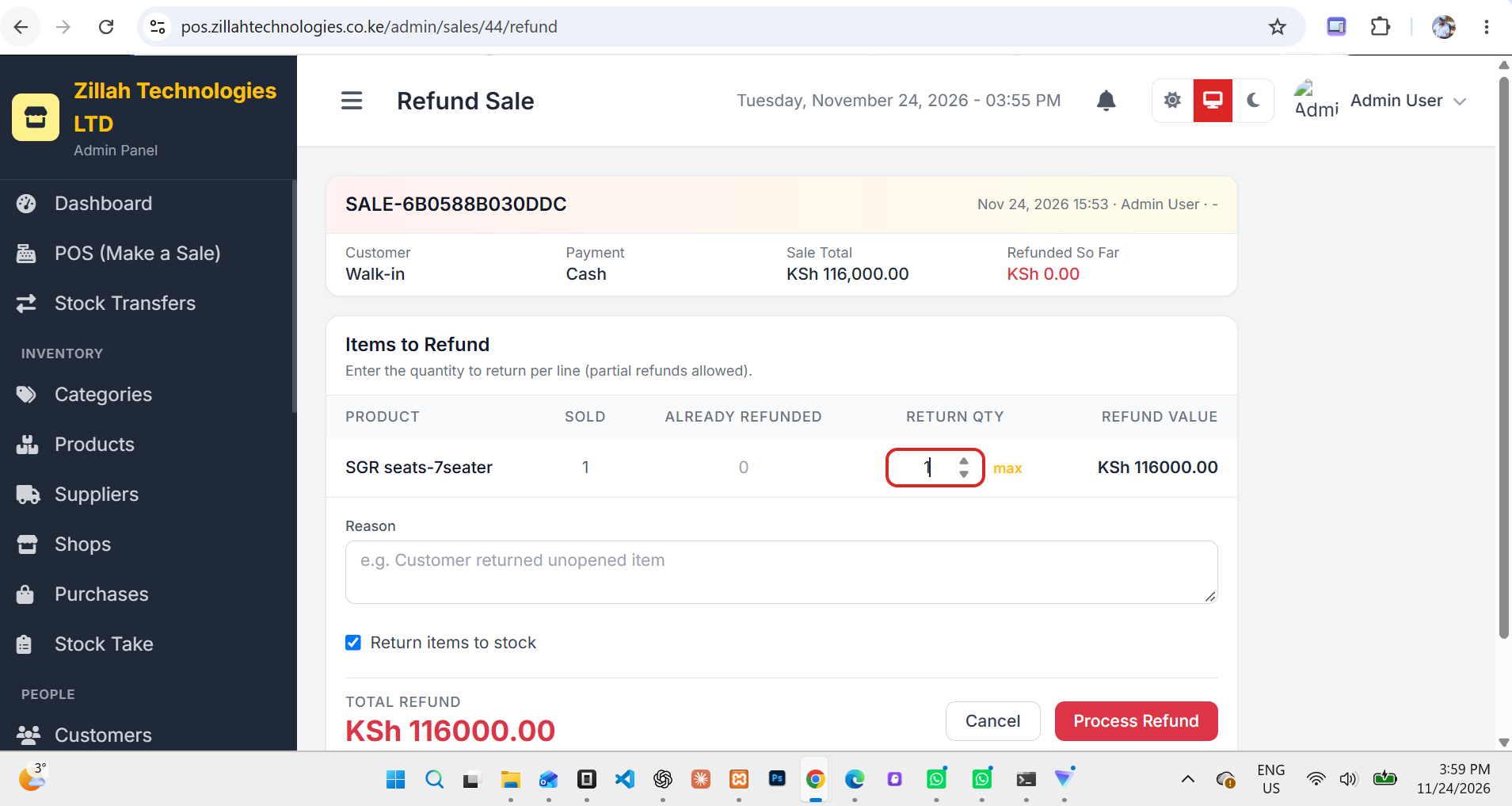
With ZillahPOS, managing customer refunds is simple, transparent, and well-organized. The system allows you to process full or partial refunds on previously completed sales while maintaining proper transaction records.
In business, customer returns and refunds are sometimes unavoidable. A customer may return a product due to a change of mind, a wrong purchase, a defective item, or other reasons.
Managing these situations manually can be challenging, especially when you need to maintain accurate sales records, update inventory, and keep track of refunded amounts.
With ZillahPOS, managing customer refunds is simple, transparent, and well-organized. The system allows you to process full or partial refunds on previously completed sales while maintaining proper transaction records.
In this guide, we walk you through how to process a refund using ZillahPOS.
1. Locate the Original Sale
To initiate a refund, first locate the original completed sale from your sales records.
Open the relevant sales transaction and access its refund option.
ZillahPOS provides a dedicated refund interface where you can review the original transaction before processing a refund.
You can verify important transaction information, including:
Original Sale Reference Number.
Customer Name.
Original Payment Method.
Total Sale Amount.
Amount Already Refunded.
This ensures you are processing a refund against the correct transaction.
2. Select the Items to Refund
Once you open the refund interface, ZillahPOS displays the products associated with the original sale.
For each product, you can view:
Product Name.
Quantity Originally Sold.
Quantity Already Refunded.
Return Quantity.
Refund Value.
Simply enter the quantity of the product being returned.
One of the key advantages of ZillahPOS is that it supports partial refunds.
This means you don't necessarily have to refund an entire transaction. If a customer purchased several products but only wants to return one, you can refund only that particular item.
The system automatically calculates the corresponding refund value based on the quantity entered.
3. Provide the Refund Reason
For proper business accountability, ZillahPOS provides a reason field where you can explain why the customer is requesting a refund.
Examples include:
Customer returned an unopened item.
Wrong product supplied.
Defective or damaged product.
Duplicate purchase.
Customer cancellation.
Recording the reason helps businesses maintain proper transaction documentation and makes it easier to review refund history when necessary.
4. Choose Whether to Return Items to Stock
Another important feature is the Return Items to Stock option.
When processing a refund, you can choose whether the returned products should be added back to your inventory.
For example:
If a customer returns an unopened product that can be resold, you can enable this option so that the returned quantity is added back to your stock.
However, if the product is damaged or unsuitable for resale, you can leave the option unchecked.
This gives businesses better control over inventory management and prevents inaccurate stock records.
5. Review and Process the Refund
Before completing the transaction, review the refund details.
ZillahPOS displays the total refund amount based on the quantities selected.
Confirm that:
You have selected the correct products.
The return quantities are accurate.
The refund reason has been provided.
The stock return option is correctly selected.
The total refund amount is correct.
Once everything is verified, click Process Refund to complete the operation.
ZillahPOS processes the refund against the original sale while maintaining the transaction records.
6. Full Refunds and Partial Refunds
Whether your business operates a retail shop, supermarket, wholesale outlet, electronics store, or any other commercial establishment, ZillahPOS gives you flexibility when handling customer returns.
You can:
Full Refund: Refund all eligible quantities from the original sale.
Partial Refund: Refund only selected products or quantities without cancelling the entire sale.
Multiple Refunds: Process returns in stages, provided there are still quantities available for refund.
The system also tracks the amount already refunded, helping prevent refunds beyond the original eligible quantities.
Why Sales Refund Management Matters
A good POS system should do more than record sales. It should also help businesses manage situations that occur after a transaction has been completed.
With ZillahPOS, businesses benefit from:
Accurate Sales Records: Refunds are associated with their original sales transactions.
Better Inventory Control: Returned items can be added back to stock where appropriate.
Flexible Refunds: Handle both full and partial product returns.
Accountability: Record reasons for customer returns.
Better Business Management: Track original sales and refunded amounts.
Reduced Manual Errors: Automatically calculate refund values based on returned quantities.
Automate Your Business with ZillahPOS
At Zillah Technologies LTD, we understand that running a business involves more than just making sales. You need a reliable system that helps you manage inventory, customers, payments, returns, and business records.
ZillahPOS is designed to simplify everyday business operations.
From making sales and managing wholesale and retail transactions to stock management, M-PESA payments, customer credit management, and now flexible sales refunds, ZillahPOS provides the tools businesses need to operate efficiently.
Stop relying on manual books and embrace smarter business management.
Get Started with ZillahPOS Today!
Ready to streamline your business operations?


Comments 0
No comments yet. Be the first to share your thoughts!